
Aim your phone at a passing jet and a label appears: a callsign, an altitude, a speed. It can feel like magic, but the idea behind it is simple and public. Aircraft broadcast short radio messages about themselves, receivers on the ground pick them up, and software turns those messages into a moving picture. This guide explains that chain in plain language, so you know what you are looking at when you open SmartMarty Sky.

What ADS-B Actually Is
ADS-B stands for Automatic Dependent Surveillance-Broadcast. Each word explains something. It is automatic because it transmits without anyone pressing a button. It is dependent because it relies on the aircraft's own navigation equipment, usually satellite positioning. It is surveillance because it lets others know where the aircraft is. And it is a broadcast because it is sent out to anyone listening, not to one particular recipient.
Traditional radar works the other way around: a ground station sends out a pulse and measures the echo. With ADS-B, the aircraft works out its own position and announces it. If you want the formal background, the ADS-B overview on Wikipedia is a good general reference.

What an Aircraft Actually Broadcasts
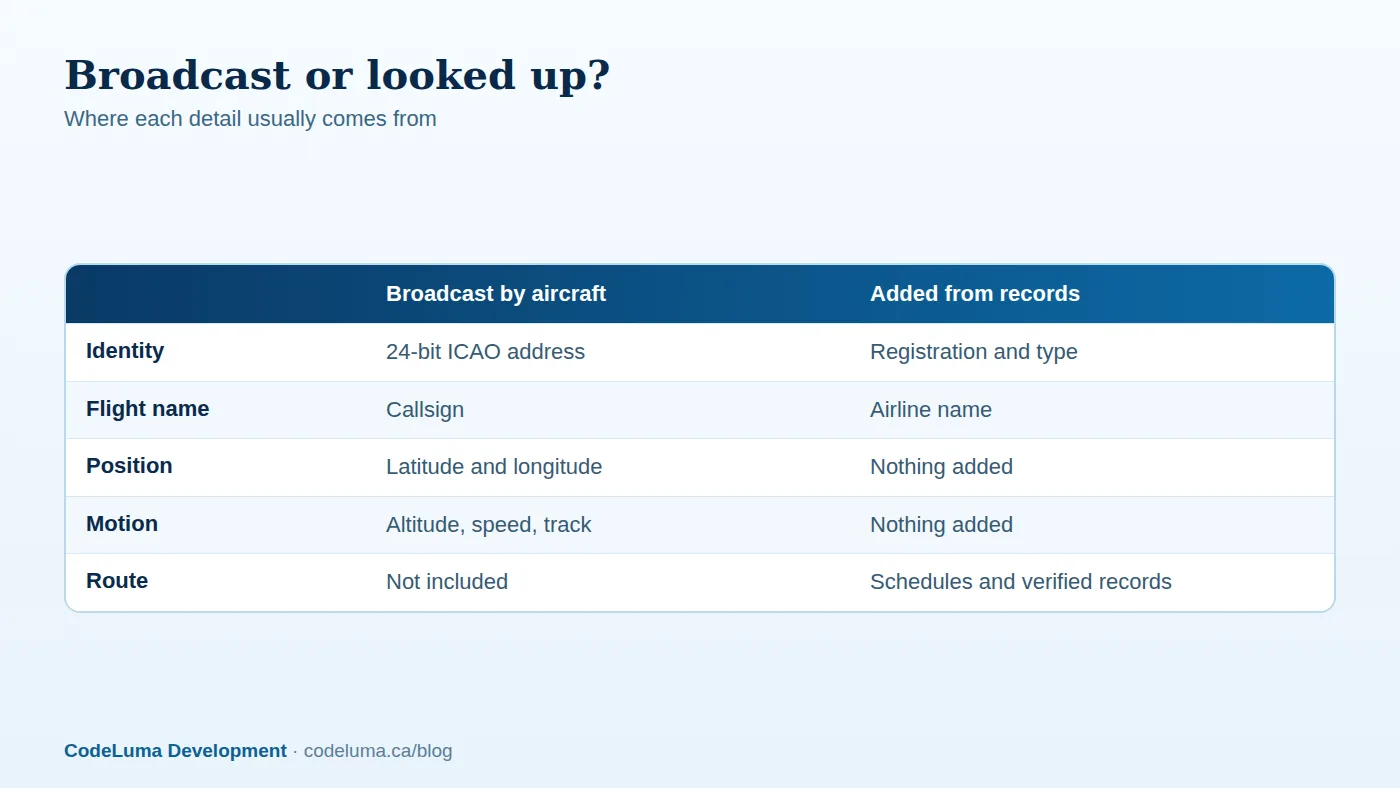
An ADS-B message is tiny. Across several message types, an aircraft typically sends:
- A 24-bit ICAO address, a unique identity code for the airframe
- A flight identification, usually called the callsign
- Latitude and longitude
- Altitude, normally measured as pressure altitude
- Speed, direction of travel and climb or descent rate
- Often a transponder squawk code
Position and velocity are sent roughly twice a second. Identification goes out less often. Pressure altitude is measured against a standard reference, so it is not the same as height above the ground.
How the Signal Travels
Most airliners transmit on 1090 MHz. Some regions also use a second frequency, 978 MHz, for certain lower-flying general aviation aircraft. Signals at these frequencies travel roughly in a straight line. Hills, buildings and the curve of the Earth block them.
That is why height matters. A high-flying airliner can be heard from a long way off, while a low aircraft may only be heard by receivers nearby. The messages are not encrypted, which is why hobbyists and apps can decode them.
From Antenna to Your Screen
A receiver is an antenna plus a small computer that decodes messages. What happens next is easy to follow:
- A receiver hears an aircraft and decodes the message.
- The decoded data is sent over the internet.
- Reports from many receivers are combined, duplicates are removed and the newest position is kept.
- Records are matched to the aircraft's identity, adding details such as registration and type where they are available.
- The app draws the result as a moving symbol.
With SmartMarty Sky you do not need your own receiver or an API key for normal use. Enthusiasts who want to go deeper can read the optional receiver guide.
Why Aircraft Go Missing or Look Delayed
Missing aircraft are normal and usually have an ordinary explanation:
- The aircraft does not carry ADS-B equipment, or it is switched off.
- No receiver has a clear line of sight, which is common at low altitude, in valleys or over remote areas.
- Certain flights, such as some military or state operations, may not broadcast or may not appear publicly.
- The data arrives a moment after the event, so the symbol shows where the aircraft was a short while ago.
SmartMarty Sky shows what public broadcasts and verified records make available. It cannot promise that every aircraft will appear.
Callsign, Registration and ICAO Address
These three identifiers are easy to mix up:
- Callsign: the flight identifier used for that trip. Airlines often use a three-letter company code plus a number, which can differ from the flight number printed on your ticket.
- Registration: the aircraft's marking, like a licence plate, usually visible on the fuselage or tail.
- ICAO address: the aircraft's 24-bit hexadecimal identity, which is normally tied to its registration.
The callsign changes from flight to flight, while the registration and ICAO address belong to the airframe. SmartMarty Sky lets you search worldwide by any of the three.
What ADS-B Does Not Tell You
ADS-B does not broadcast where a flight started or where it is going. It does not say who is on board or who owns the aircraft. Routes shown in an app come from schedules and verified records matched to the callsign, so they can be missing or imperfect.
Respect that boundary. Tracking is for enjoying aviation, not for guessing at the movements or ownership of private aircraft.

Reading Sky View and Map View
Sky View is a radar-style live view of aircraft within a fixed 200 kilometres. Map View is a zoomable world map with no distance limit. Try this:
- Go outside somewhere with a wide view of the sky, from a public place.
- Open Sky View and find a symbol in the direction you are facing.
- Look up and match the label to the aircraft you can see.
- Check the details shown, such as altitude and speed, against what you observe.
- Switch to Map View to follow the same aircraft beyond your horizon.
Common Mistakes
- Treating a missing aircraft as a fault. It may simply be out of receiver reach or not broadcasting.
- Reading altitude as height above the ground.
- Expecting the callsign to match your ticket's flight number.
- Assuming route details are always complete.
- Using the app as a navigation, air-traffic or safety tool. It is an information and enthusiast tool only.
A Quick Spotter's Checklist
- Choose a public spot and follow local rules. Never trespass near airports.
- Check the airport directory to learn about the airports near you.
- Look for open sky, since receivers need line of sight too.
- Note the callsign, registration and type together.
- Give the data a moment to update before deciding something is wrong.
Why Understanding This Matters
Once you know that every symbol is a real aircraft announcing itself, the screen makes more sense. You can tell why a plane is missing, why a route is blank, and why a callsign looks unfamiliar. That understanding turns a curious glance into real spotting. If you enjoy this idea, why live aircraft tracking is worth having in your pocket covers the wider picture.
New accounts can try SmartMarty Sky with the one-time 60-minute free trial and watch the chain from this article play out overhead.
Wrap-Up
ADS-B is a simple idea: aircraft announce their identity, position and movement, receivers listen, and software draws the result. Coverage, details and routes depend on what is broadcast and recorded, so treat the view as a fascinating window rather than a guarantee. Understand the chain, and every symbol on the screen has a story you can read.
See what is flying overhead
Now that you know how a plane's broadcast reaches your screen, see it happen with the aircraft above you. New accounts can start the one-time 60-minute live-access trial and compare Sky View with what you can see out the window.
- Start the free trial - a one-time 60-minute live-access trial for new accounts.
- Install SmartMarty Sky - Android, iPhone and iPad web app, Windows, Linux and browser options.
- Optional receiver guide - advanced receiver setup for enthusiasts.
- Airport directory - medium and large airports worldwide, browsable by country.
Look up and know. SmartMarty Sky shows live nearby aircraft on a radar-style Sky View and a worldwide map. New accounts can use a one-time 60-minute live-access trial. It is an enthusiast information tool, not a navigation or safety system.